Happy Janmashtami AI Edit
The devotional Janmashtami temple frame trending this Krishna Janmashtami season. Copy the prompt below, follow the steps, then jump into ChatGPT to generate your own edit.
🖼️ Real Result
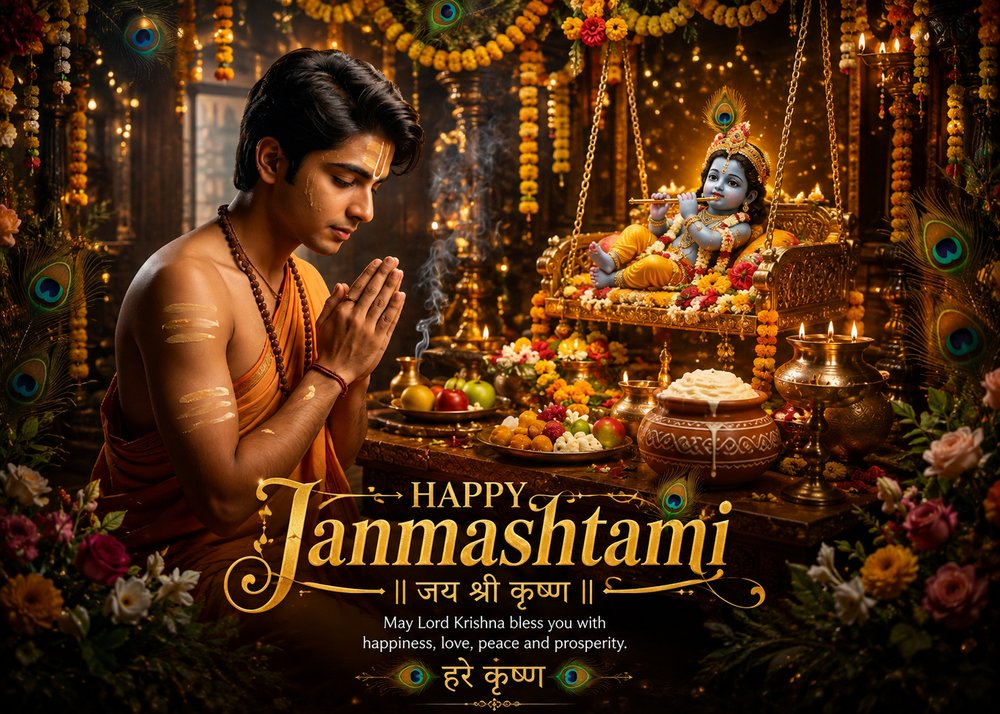
📋 The Prompt
Transform this photo into a devotional Janmashtami temple scene: place the person kneeling in prayer with folded hands (Anjali mudra), eyes gently closed, forehead marked with sacred tilak, wearing warm saffron/orange traditional attire with a rudraksha mala necklace. Beside them, a beautifully decorated golden swing (jhula) holds an ornate infant Krishna idol wearing a peacock-feather crown and playing the flute, surrounded by marigold and peacock-feather garlands, strings of fairy lights, and rich temple pillars. In front, an ornate puja thali with diyas, incense smoke, fruits, sweets, and a decorated clay pot of makhan (butter) sits on a carved wooden table. Warm golden-hour temple lighting, soft glowing bokeh, cinematic depth of field, rich devotional atmosphere. Add elegant gold festive typography at the bottom reading "Happy Janmashtami" with "जय श्री कृष्ण" underneath, and a short blessing line, plus "हरे कृष्ण" at the very bottom. Ultra realistic, cinematic photography, warm golden-hour lighting, intricate temple detail, 8K, HDR, professional color grading, keep the person's face and identity accurate and unaltered.
🪜 How To Create The Image
- Open ChatGPT and start an image chatClick the button below, then click the "Create image" button in ChatGPT.
- Log inSign in with your Google account when asked.
- Upload your photoClick the plus (+) icon below the message box and upload your photo.
- Copy the promptCopy the prompt shown above.
- Paste itPaste the prompt into the text box in ChatGPT.
- Send itHit send — your Janmashtami Edit will be generated in a few seconds.
- Download itOnce it's ready, click on your image and download it to your device.
Open ChatGPT & Follow Steps
Opens in a new tab — come back here anytime for the prompt.